Drafting a resume, scouring online listings, and trying to stand out from countless other applicants can be time-consuming and tedious, especially if you’re not using the right tools. Luckily, there are now a number of apps that streamline the job search process, offering you easier and more effective ways to land your next gig.
We’ve been covering technology since 2008 and have been tracking the best new apps on the market. Along the way, we’ve become experts at distinguishing between an excellent app and an unhelpful data-drainer. For this guide, I searched through the iOS and Android app stores to gather the best job-finding apps. Along the way, I found several standouts, including ZipRecruiter for networking, Glassdoor for salary transparency, and Canva for quickly building polished resumes.
How we rated the best apps to help you find a summer job
WhistleOut searches for Android and iPhone apps that are easy to use and affordable. We evaluate apps through hands-on testing and rate them on a five-star scale based on the following criteria:
- User experience: We search for apps that enhance the user experience, improving the power of your phone and making your life less complicated. The apps we recommend are intuitive, allowing users to put them to use as soon as they open them.
- Price & value: We select apps that charge minimal download fees and tend to favor apps that don't charge anything. We do include some apps that charge fees, though we guarantee that they're worth the price tag.
- Efficacy: App developers like to talk a big game; we test their products to see if they deliver on their promises.
- Practicality: Your phone has a limited amount of storage, so you don't want to clog it with single-use apps that don't improve your day-to-day life. We reward apps that are worth their weight in data.
- Privacy & security: We evaluate the permissions an app requests, sussing out the legitimate from the suspect. We also scour user reviews on relevant app stores to see if customers are reporting security concerns and investigate the veracity of those complaints.
Best job search apps

ZipRecruiter Job Search
Let this app do the work in your job hunt
There’s no shortage of job-search apps in 2026, but many still suffer from the same problems they had years ago: fake listings, outdated postings, and overwhelming clutter. That’s what continues to make ZipRecruiter stand out. Rather than forcing you to scroll endlessly through irrelevant jobs, the app focuses on surfacing opportunities that align with your resume and preferences.
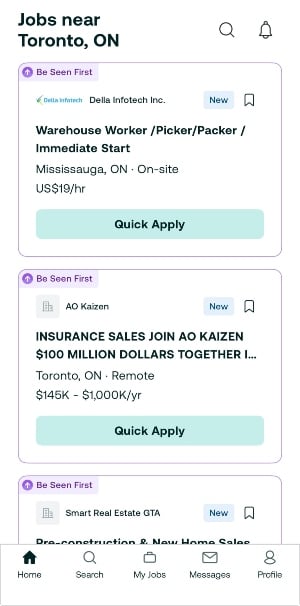
Image: Steve Vegvari
After uploading my resume and setting preferences for writing, media, and remote positions, I found the recommendations were surprisingly accurate. Within a day, the app was surfacing hybrid editorial and marketing jobs around Toronto that matched both my experience level and salary expectations.
Compared to some competitors, ZipRecruiter’s interface also felt noticeably cleaner and less chaotic. Indeed and LinkedIn can sometimes overwhelm users with duplicate listings and unrelated social content, whereas ZipRecruiter keeps the focus squarely on finding work.
ZipRecruiter also streamlines the application process. Once your resume and profile are uploaded, applying to jobs takes only a few taps. For students or graduates rapidly applying to multiple summer positions, that convenience matters.
The app also lets you filter by remote, hybrid, or in-person work, which feels especially relevant now that many Canadian companies continue offering flexible work arrangements. It’s one of the easiest apps to recommend if you’re looking for a straightforward, low-stress way to search for work.
Glassdoor
Learn the truth about the job before you take it
A polished job description only tells part of the story. Glassdoor remains one of the few apps that helps pull back the curtain before you commit to an interview process or job offer. What continues to make Glassdoor valuable in 2026 is its salary transparency and workplace reviews. When applying to several media and communications roles in Ontario in the past, I found myself checking Glassdoor almost automatically.
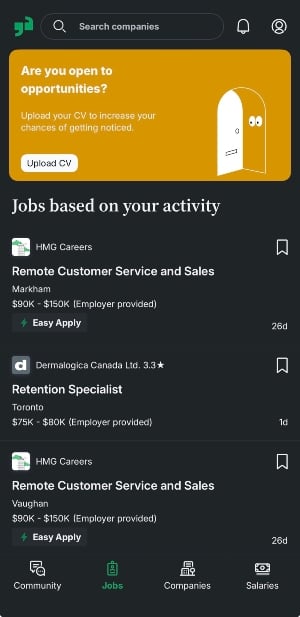
Image: Steve Vegvari
Seeing real employee feedback about management, workload, and compensation painted a much clearer picture than the company websites themselves ever could. In a market where the cost of living in cities like Toronto and Vancouver keeps rising, having accurate salary expectations upfront is incredibly useful.
The app’s company ratings are particularly helpful for students and recent graduates entering the workforce for the first time. It can be difficult to tell the difference between a healthy workplace and one with high turnover or unrealistic expectations. Glassdoor’s interview reviews and workplace insights help fill in those gaps. I also appreciated how easy it was to compare salary ranges for similar positions across different employers, especially in marketing and media-related industries.
Looking to organize your job prospects?
As your interview requests start to arrive, you’ll need to keep all your options organized. We’ve compiled a list of the 12 best apps to organize your life, breaking down the advantages of using apps like Calendly and Toggl Track.

Canva
Redesign your résumé with easy-to-use templates
Most apps overcomplicate the resume-making process. I remember using Microsoft Word to create my first resume drafts as a teenager, and it was a horrid experience. I've tried several other apps, and many were flooded with ads, subscription pop-ups, or locked templates behind expensive paywalls. One app even watermarked exported resumes unless I paid to remove it. Canva ends up being the easiest and most effective option by a considerable margin.
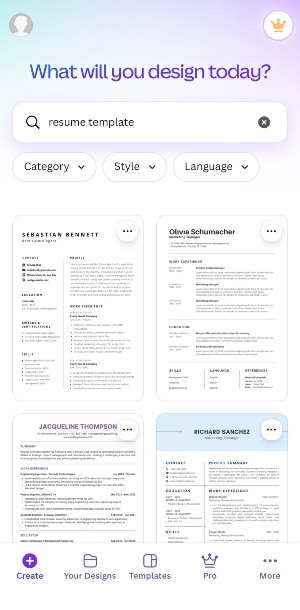
Image: Steve Vegvari
Although Canva is primarily known as a graphic-design platform, it has quietly become one of the best resume-building tools available. Its templates feel modern without looking overly flashy, which is a difficult balance to strike. Whether you’re applying for retail jobs, internships, creative roles, or office positions, there’s enough flexibility to build something polished without needing any design background.
What stood out most during testing was Canva’s AI-assisted Magic Write feature. After importing portions of my resume, I used the tool to tighten wording and simplify awkward bullet points. It won’t magically write the perfect resume for you, but it does help sharpen copy in a way that feels genuinely useful rather than gimmicky. For students or graduates struggling to make limited work experience sound more professional, it can be a surprisingly effective tool.
The mobile experience is also excellent. Making quick edits on an iPhone while commuting or waiting between classes felt seamless, and exporting PDFs was simple. Canva succeeds because it lowers the barrier to creating something that actually looks professional.
Best apps for
part-time or odd jobs

Bluecrew
Pick up shifts when you want
Not everyone searching for summer work is looking for a traditional full-time job. Some people simply want flexible shifts they can pick up between classes, internships, or travel plans. That’s where Bluecrew comes in.
Bluecrew focuses heavily on temporary and shift-based work, surfacing opportunities in industries like hospitality, warehousing, event staffing, and customer service. During testing, I found the app much more focused than some competing gig-work platforms. Several alternatives I tried simply recycled listings from Indeed or other larger sites, making them feel redundant. Bluecrew, by comparison, felt curated and purpose-built for short-term work.

Image: Kevin Kearney
The app also makes it easy to filter opportunities based on availability and location. Searching around the Greater Toronto Area surfaced positions for catering events, warehouse support, and retail shifts relatively quickly. While there weren’t as many listings as on broader platforms like Indeed, the quality felt higher overall. I spent less time filtering through irrelevant jobs and more time looking at actual opportunities that were hiring immediately.
For students or anyone looking to supplement their income during the summer, Bluecrew fills an important niche. It’s less about building a long-term career and more about quickly connecting people with legitimate, flexible work opportunities.

Fiverr
Grow your online side hustle
Traditional summer jobs aren’t the only way to earn extra money anymore. Freelancing has been a consistent part of my life for over 10 years. It's grown especially strong among students and young professionals looking to monetize their creative or digital skills. Fiverr remains one of the easiest entry points into that world.
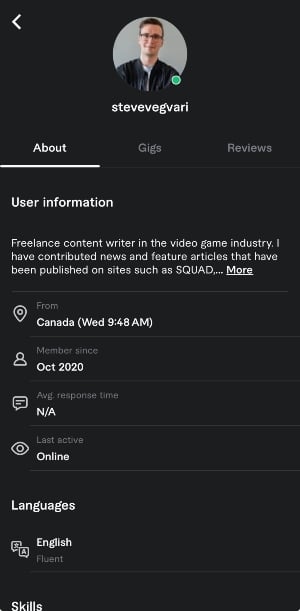
Image: Steve Vegvari
The app allows users to create service listings for everything from writing copy and graphic design to video editing, voice acting, and social media management. Setting up a profile only takes a few minutes, and the storefront-style layout makes it approachable even for beginners. During testing, I found the app especially useful for managing communication and tracking projects while away from a desktop.
What makes Fiverr appealing is how accessible it feels compared to more intimidating freelance marketplaces. Upwork, for example, can feel highly competitive and overly corporate for newcomers. Fiverr’s structure is more casual, making it easier for students or first-time freelancers to experiment with side work. The platform also handles contracts, payments, and messaging internally, which simplifies the administrative side of freelancing considerably.
That said, Fiverr still takes a significant cut from each transaction, which can eat into smaller projects. But for people trying to build a portfolio or earn extra income remotely during the summer, it remains one of the strongest freelance apps available today.
How WhistleOut reviews apps
Our mobile experts scour the app stores every month, looking for the best new apps for Android and iPhone. Before recommending an app, we use the app for at least one full workday, testing its basic functionality and evaluating whether or not it delivers on its promises.
-
Easy to use
Great apps simplify your phone. We selected the tools that don't require a complicated instructional manual. -
Affordability
The internet is filled with expensive price tags, but we're not buying what they're selling. We leaned into inexpensive, quality apps. Extra points if they're free! -
Hands-on testing
We played around with these before recommending them, ensuring they're worth your download.
From there, we weigh the app's pros and cons and then determine whether or not it's a worthwhile download for the wider population of cell phone users.
Steve Vegvari
Staff Writer

Thousands of cell phone plans unpacked. All the facts. No surprises.

Related Articles



Find Better Phones and Plans
Hundreds of cell phone plans unpacked. All the facts. No surprises.