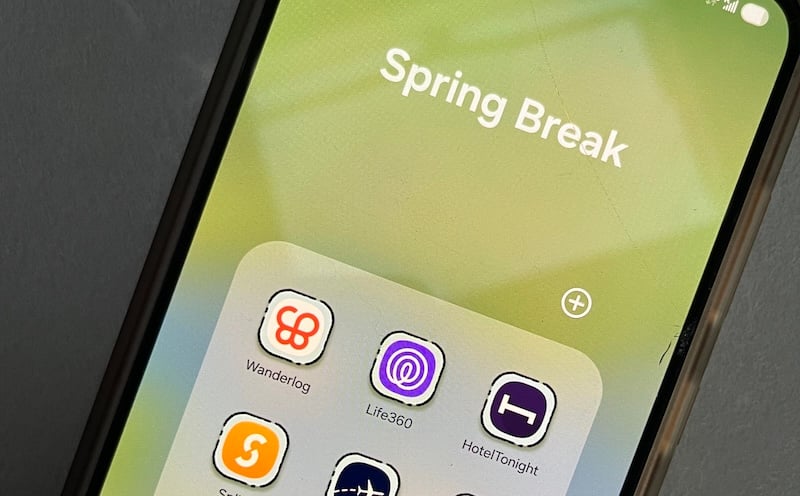
Spring has sprung, and warmer weather is officially here. After months of deadlines, exams, and surviving on dining hall food, you've earned yourself a Spring Break where your biggest decision is which beach to plant yourself on.
But before you head off, make sure you're ready to travel. I tested 10 different apps and narrowed them down to eight that are essential for Spring Breakers. From flight tracking to suitcase packing, I've found the best apps to download so you can get some well-deserved rest and relaxation.
Whether you're heading to Cancun, doing a road trip, or figuring it out as you go, these are the eight apps worth downloading for a stress-free Spring Break.
📱 Heading somewhere international this Spring Break?
Make sure your phone plan covers you before you land. International data can be pricey, but it doesn't have to be.
Check out our guide on the best phone plans for international travel, or compare the most popular plans with global perks below:
|
#1
|
Bell

Ultra Unlimited Canada-International
$100.00/mth
(includes Autopay and promotional discount)
|
|
#2
|
Telus

Complete - Unlimited 5G+ Explore
$115.00/mth
(after $10/mo. credit)
|
Best apps for trip planning and packing
1. Wanderlog
- Free (with premium tier)
- Available for iOS and Android
Wanderlog is hands-down the most useful app I've ever used for travel. It's the all-in-one travel planner that lets you build your dream trip. You can import flights and hotel bookings, collaborate with your whole travel group in real time, and browse activity suggestions (that are actually great). It even includes an in-app trip journal. Best of all, it's free.
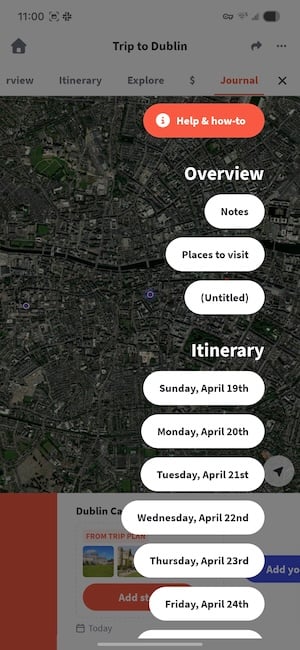
Image: Jessica Santero | WhistleOut
The integrated map is probably my favourite part of using Wanderlog. I'm a visual learner, so I usually reference the map on my phone when planning a trip. All your planned activities show up as pins on a single map. You can immediately see what stops are nearby and plan a practical route so you don't end up walking up and down the same street several times.
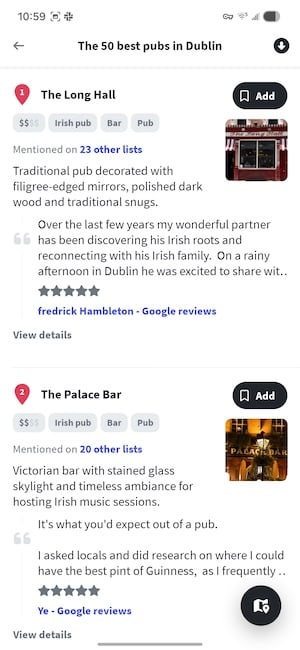
Image: Jessica Santero | WhistleOut
Wanderlog works well for solo travellers, but it works even better for group trips. Your friends and family can collaborate within the app, so if Mike wants to see a certain monument, he can add it to the map. Just make sure everyone going on the trip has the app downloaded since you have to share a join code. Plus, setup only takes about six minutes maximum.
Wanderlog does offer a Pro version, which might be worth paying for right before your trip. The upgrade includes offline access, so if you're heading somewhere with patchy connectivity, you would still have access to everything. For a domestic trip within the United States (and your cell phone data), the free version handles everything.
We've covered it in more detail in our full Wanderlog review if you want the complete rundown before downloading.
2. PackPoint
- Free (with premium tier)
- iOS, Android
I had low expectations for this app, but I'm never deleting PackPoint. I consider myself an excellent packer and almost never forget anything. On the flip side, my boyfriend always forgets at least one thing. PackPoint makes sure we have everything we need.
Start by entering your destination, travel dates, and your planned activities. That includes beach days, long hikes, fancy dinners, and whatever you choose. PackPoint then generates a customized packing list based on your activities and the actual weather forecast for your trip dates. It isn't just a generic checklist pulled from a template, but a list made just for you.
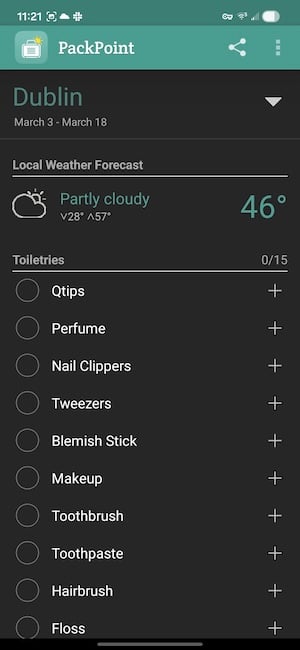
Image: Jessica Santero | WhistleOut
The weather forecast integration is what makes PackPoint a Spring Break must-have. It automatically factors in conditions at your destination during your specific dates. That way, you're prepared with a raincoat for afternoon thunderstorms or reef-safe sunscreen for snorkelling.
PackPoint offers a premium plan that includes TripIt integration. It pulls in your trip details directly so you don't have to enter them manually. For group trips, you can also see what others are already bringing, so nobody shows up with four portable speakers and zero phone chargers.
Best apps for travel and safety alerts
3. Flighty

- Free (with paid tiers)
- iOS only, with an Android waitlist
Make sure your flight is on time with Flighty, because some airlines will let you know about a delay at the last possible minute—if they bother telling you at all before you're already at the gate. Flighty pulls live data from the FAA, air traffic control feeds, and gate systems to deliver alerts before any official notification from the carrier.
Flighty is one of the most accurate flight tracking apps because it monitors the specific aircraft assigned to your flight, not just your flight number. If the plane flying your route is currently sitting on a tarmac in another city with a mechanical hold, Flighty flags it before that delay gets officially announced. That window gives you time to think through your options calmly rather than scrambling at the gate.
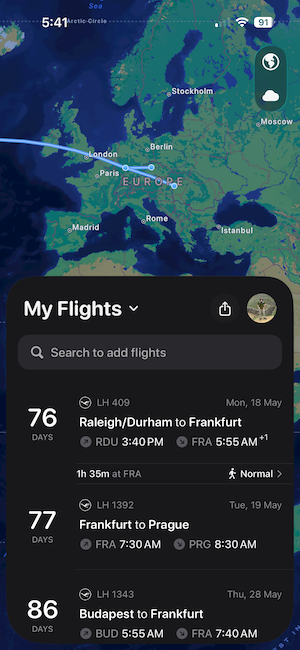
Image: Max McCaskill | WhistleOut
Your notifications and alerts are organized by type, including gate changes, delays, cancellations, and baggage claim updates. That way you're not bombarded by tons of repeated alerts. You can also share your flight with your travel group directly from the app to keep everyone informed with up-to-date details.
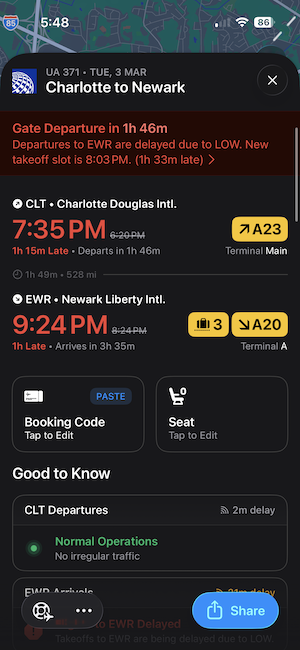
Image: Max McCaskill | WhistleOut
My colleague, Max, has been using Flighty since 2024. He's also been a long-time subscriber to Flighty Pro, and explained, "I usually find out about potential delays or changes from Flighty well before the airline sends me an official alert. The airline will generally wait until the last minute to send a delay or cancellation notification, so it's nice to be mentally prepared and already have a plan in place when the official alert finally comes."
Flighty Pro also includes weather forecasts, live aircraft location, and your full flight history. Max added every flight he could find, stretching back to 2018. His All-Time Flighty Passport shows 34,167 miles flown across 11 airlines to 22 airports. You can also break it down by preferred seats, most-flown days of the week, and aircraft frequency.
The only downside is that Flighty is only available for iOS—for now. Android users can join the waitlist, though. That means mixed groups will need to point Android users toward their airline's app or another option in the meantime.
Is your phone bill too high?
Most people don't realize they could cut their phone bill in half just by switching to an MVNO. These smaller carriers run on the exact same networks as Rogers, Bell and Telus, just without the premium price tag.
Check out the best MVNOs below:
|
Fido

$50 Data, Talk & Text Plan with 60GB - Entry
$50.00/mth
with Auto-Pay discount
|
|
Koodo Mobile

$159 Prepaid 365 Day Plan
$159.00
Per 365 Day Top-up
+ $10 Upfront
|
|
Chatr Wireless

$35 Nationwide Talk, Text & 4G Data plan
$35.00
Per 1 Month Top-up
+ $10 Upfront
|
4. Life360

- 7-day free trial, then from $5.49/month
- Available on iOS and Android
Life360 is known as a family safety app, but it does so much more than that. You can see the real-time location of anyone (or anything) in your circle, including family, friends, pets, and even important objects. Everyone in your circle shows up on a shared map with their current location, and even their battery level too.
But why is it so important for Spring Break? Sharing your location while away gives your parents peace of mind without requiring you to send a check-in text every few hours. You can also keep tabs on your friends while on vacation (there's always one person in the group who likes to wander).
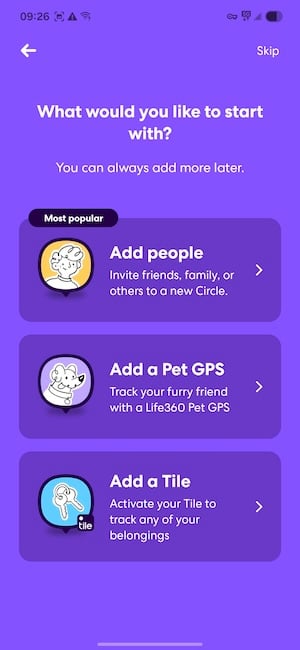
Image: Jessica Santero | WhistleOut
But most importantly, Life360 keeps you safe and your family informed in emergencies. Life360 includes SOS buttons, automatic crash detection, and roadside assistance to make sure you're covered at the best and worst times.
Life360's paid tiers start at $7.99 CAD/month. The difference between plans depends on location history length, roadside assistance coverage, and stolen phone protection. You might not need a full subscription, though. Opt for the 7-day free trial while on Spring Break. Use it for the trip, then decide whether you want to keep it.
Save on a brand-new iPhone
Upgrading to a new iPhone doesn't have to mean paying full price. Between trade-in credits, carrier promotions, and timing your purchase right, there are plenty of ways to save.
Check out the best deals on a new iPhone below:
iPhone 16 128GB
- 6.1 inch display
- Rear Cameras: 48MP, 12MP
- Front Camera: 12MP

iPhone 16 256GB
- 6.1 inch display
- Rear Cameras: 48MP, 12MP
- Front Camera: 12MP

iPhone 18 Pro 256GB
- 6.3 inch display
- Rear Cameras: 48MP, 48MP, 48MP
- Front Camera: 18MP


5. Google Maps (and don't forget to set up offline mode)
- Free
- Available for iOS and Android
Google Maps is a spring break essential because nobody knows how to read a physical map anymore. In fact, WhistleOut surveyed 1,000 people, and one in three admits they wouldn't be able to get around with an atlas. So, naturally, a navigation app is the best choice to guide them.
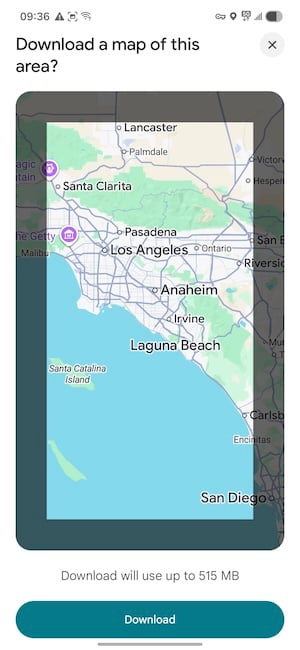
Image: Jessica Santero | WhistleOut
Ask anyone on my team and you'll get the same answer: Google Maps is the best. Whether you use it as a central hub for everything like Aaron (for directions, hours, reviews, food ordering), or you're there purely for the accurate ETAs and real-time traffic alerts like Scott, Google Maps earns its place on every phone. Steve even says it's right up there with his Starbucks app, which means a lot coming from someone who takes his coffee seriously.
However, make sure you download some maps so you can use Google Maps offline. If you're travelling outside the country, your cell phone plan might not include data. That means you might not be able to use Google Maps, at least without paying hefty roaming fees.
Not sure how to set up offline Google Maps? Check out our guide so you can access directions, transit information, and local stores without data.
Best app for communication and language barriers
6. Google Translate

- Free
- Available for iOS and Android
If you're heading to Mexico, Greece, Belize, or anywhere that isn't an English-speaking country, Google Translate is a non-negotiable. Most people know it exists, but fewer people know about the features that make it the best translation tool on a trip.
The camera translation feature is the most useful for travel in general. Just point your phone at a menu, a sign, a rental car contract, or anything with text, and the app translates it in real time—right in the image. No typing necessary at all. It works offline if you download the language pack in advance, which you should absolutely do before you fly.
You can also translate mid-conversation. You speak in English, the app plays the translation aloud in the target language, and when the other person responds, it translates back. It's not perfect, but it works in a pinch, like communicating with a driver, asking for directions, or sorting out a hotel issue at the front desk.
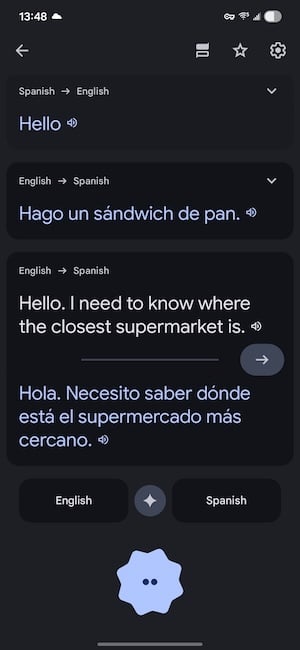
Image: Max McCaskill | WhistleOut
Google Translate isn't the only language app out there. We've covered the comparison in depth in our Google Translate vs DeepL piece and our full Google Translate review. iPhone users should also read our piece on Apple Translate vs Apple Intelligence before deciding which to rely on.
Best app for money management
7. Splid
- Free
- Available for iOS and Android
Splitwise might be the most well-known expense tracking app, but it isn't the best. Splid is superior because it's completely free with no daily entry limits, doesn't require a subscription, and you don't need an account to participate. For comparison, Splitwise's free version caps how many expenses you can log per day, which might not sound like much, but the last thing you want to worry about is how many times you've paid on vacation.
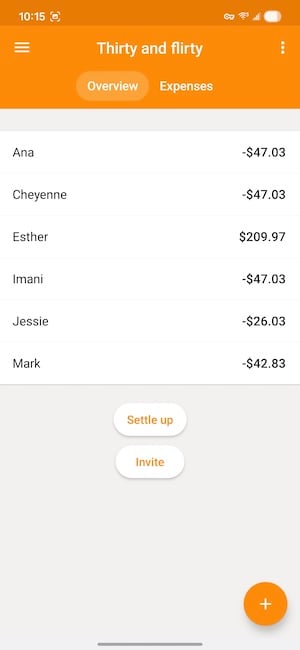
Image: Jessica Santero | WhistleOut
The settle-up calculation is necessary for Spring Break, whether you're travelling with one friend or a large group. Rather than everyone paying everyone else, Splid works out the minimum number of transactions needed to clear all debts between group members. It also exports the full expense summary as a PDF or Excel file. I usually track trip spending in a running Google Sheet, and this is much easier and looks considerably better.
Splid works offline and supports 150+ currencies. It even includes the current currency exchange rates so you can see how much you're really spending.
Best app for booking stays
8. Hotel Tonight
- Free
- Available for iOS and Android
I've defended Booking.com for years, and it's still a solid tool—but I've noticed it quietly raising its commission fees. That pushed me to start comparing more carefully, which is how I landed on Hotel Tonight.
You can find cheap last-minute hotels, hostels, and inns on Hotel Tonight. It specializes in low-cost bookings to fill empty rooms at a decent price. It also includes a Daily Drop, which is an extra discount for a limited time (about 15 minutes). It sounds like a gimmick but it dropped a hotel I've been eying by about $20/night.
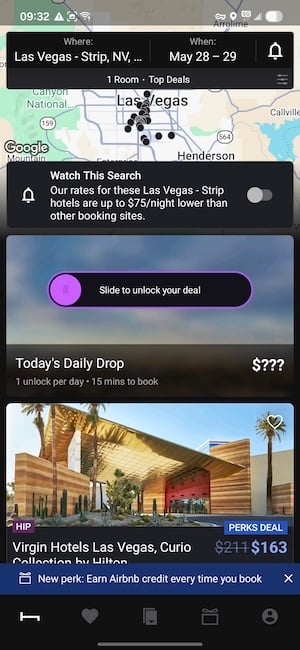
Image: Jessica Santero | WhistleOut
I ran a direct price comparison for a Las Vegas trip. Hotel Tonight showed a room at the Fontainebleau for $292/night. Booking.com listed the same room at $312/night. That's a $20 difference per night on a single room. When booking for Spring Break, keep in mind which app is cheaper. That gap adds up to real money that stays in your pocket rather than going to a platform commission.
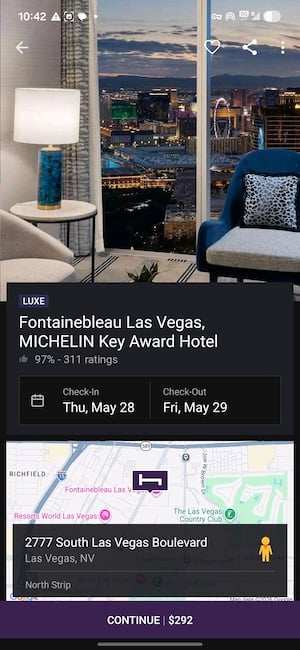
Image: Jessica Santero | WhistleOut
One thing I don't like about Hotel Tonight is that it doesn't always specify bed type up front, the way Booking.com does. If the room configuration matters for your group's rooming situation, confirm before completing the booking. It's a small detail, but something to keep in mind.
Bookings through Hotel Tonight earn you Airbnb credits, which is a useful bonus if your group prefers a rental on the next trip.
Don't forget to prep your phone for travel
Apps are only useful if your phone actually works when you land. If you're heading overseas this Spring Break, make sure you prep your phone before your vacation.
Best Spring Break apps: FAQ
What's the best app for tracking a spring break flight?
Flighty is the best app for real-time flight tracking. It pulls from live FAA data and air traffic control feeds and typically alerts you to delays before the airline does.
Is Life360 only for families?
No, Life360 isn't only for families; it works just as well for friend groups.
Do these apps work without Wi-Fi or data?
Several of the apps listed can be used without Wi-Fi or data. Google Maps works offline if you download the map for your destination before you travel, and Google Translate works offline with downloaded language packs. Splid has full offline functionality too.
Is PackPoint worth it for a short trip?
Yes, PackPoint is worth it for any and all trips. The weather-based packing list generates in about two minutes and consistently surfaces items you'd pack confidently and then forget.
Is Hotel Tonight actually cheaper than other booking apps?
Yes! Hotel Tonight is absolutely cheaper. I tested it myself and found it to be about $20/night cheaper.
What's the difference between Splid and Splitwise?
Both apps track shared expenses and calculate who owes what. Splid's advantages are that the free version has no daily entry limits, no subscription model, no sign-up required, and it works offline.
Jessica Santero
Staff Writer

Find a better phone plan
Thousands of cell phone plans unpacked. All the facts. No surprises.
Related Articles



Find Better Phones and Plans
Hundreds of cell phone plans unpacked. All the facts. No surprises.