Getting your first real paycheck is exciting, but do you know how to spend it smartly? Between rent, groceries, that streaming service you forgot to cancel, and the random late-night Amazon purchases, your paycheck can quickly disappear. Add student loan payments, utilities, and the very real possibility of splitting bills with roommates for the first time, and the math gets complicated fast.
All recent grads starting their first job should track their finances with a budgeting app. As soon as you know where your money goes, the faster you can start saving (or investing) for your future. If you're just starting to earn money, you can choose Goodbudget since it's free (and safe), or you can pay for a premium app like Simplifi for more financial transparency.
Here are the five best budgeting apps for new graduates to help you start saving and get a jump on financial stability.
Best budgeting apps for new grads at a glance
| App | Best for | Price |
|---|---|---|
| Simplifi | Tracking spending and saving | $2.99/month when billed annually |
| Goodbudget | Learning to budget | Free |
| YNAB | Detailed budgeting and investing | $14.99/month |
| Rocket Money | Subscription tracking and cancellation | $6–$12/month |
| Monarch Money | Household or couple spending | $14.99/month |
Ready to leave your parents' phone plan?
If you're striking out on your own, a budgeting app will help you work that new phone bill into your monthly expenses without breaking a sweat. Not sure where to start? Read our guide on how to leave a family plan or what to know before going independent.
Check out some of the most affordable plans on the market right now:
|
PC Mobile

$19 Unlimited Talk & Text
$19.00
Per 1 Month Top-up
+ $10 Upfront
|
|
Fizz

Unlimited Minutes & Text Messaging + 1GB Data
$19.00/mth
+ $15 Upfront
|
|
7-Eleven SpeakOut

$19 Smartphone Plan
$19.00
Per 30 Day Top-up
+ $10 Upfront
|
Best low-cost app: Simplifi by Quicken
The cheapest full-featured budgeting app (that almost made me switch)

- Available on iPhone and Android
- Subscription costs $5.99/month, or $2.99/month when billed annually.
There's a long list of must-have apps that students and grads need. But if you want a budgeting app that automatically shows how to cut down on expenses, Simplifi by Quicken is the best low-cost option to track spending.
Simplifi is the most affordable premium budgeting app. It only costs $2.99/month when you sign up for a year (that's less than a daily Starbucks coffee), and it's worth every penny. In fact, I was so impressed that I almost ended my long-time subscription with YNAB to join Simplifi.
I was so impressed, I seriously considered switching to Simplifi.
It's that good for the price.
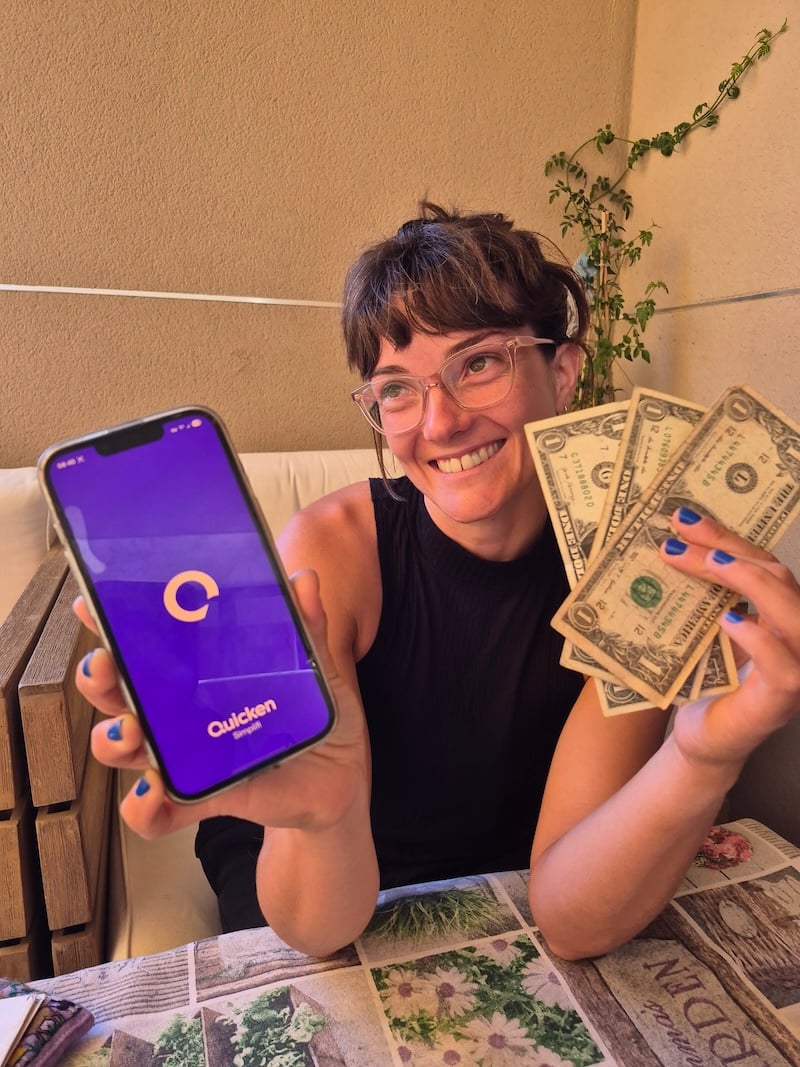
Image: Jessica Santero | WhistleOut
Simplifi makes budgeting a no-brainer: it tracks your monthly income as soon as it hits your bank account, subtracts your regular bills and savings goals, and builds a personalized spending plan that updates according to your actual spending.
One of the best Simplifi features is the calendar—you can see when your paycheck reaches your bank and when your upcoming bills will be charged in a single monthly view. Understanding your financial timeline is essential, so you're not caught off guard by an annual subscription you'd completely forgotten about.
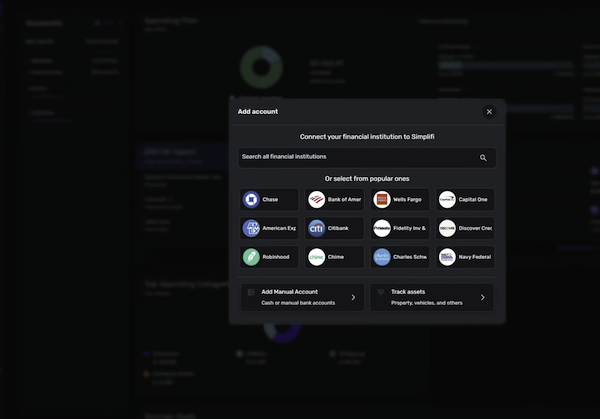
Image: Jessica Santero | WhistleOut
Unfortunately, Simplifi doesn't offer a free version of the app—but Quicken offers a 30-day money-back guarantee. You can try it for a full month risk-free to see if you like it. And if you plan on managing multiple investment portfolios, you may outgrow Simplifi faster than some of the other, more premium options.
But for a first-time budgeter who wants to understand their cash flow without a steep learning curve, Simplifi lives up to its name.
Your budgeting app works best when you're connected
College students can score discounted phone plans by showing a school ID. If you aren't sure where to start, read all about it in our guide to the best phone plans for students.
Below, you'll see some of the most popular plans:
|
Rogers

Popular Plan
$85.00/mth
(after Auto-Pay discount)
|
|
Freedom Mobile

$50 5G+ Unlimited 175GB CA-US plan
$50.00/mth
(after Digital Discount)
|
|
Telus

Select 60GB 5G+
$80.00/mth
|
Best free app: Goodbudget
The best tool to learn how to budget

Goodbudget is a completely free budgeting app built around the envelope method, a system where you divide your income into categories at the start of each month and only spend what you've allocated to each one.
Once an envelope is empty, there's no more money to spend in that category until the month resets. My mom actually taught me to budget this way growing up, dividing my allowance into envelopes for spending, saving, and everything in between. Goodbudget uses the same system, but an app is easier to use and doesn't involve getting yelled at if you don't budget well one month—sorry, Mom.
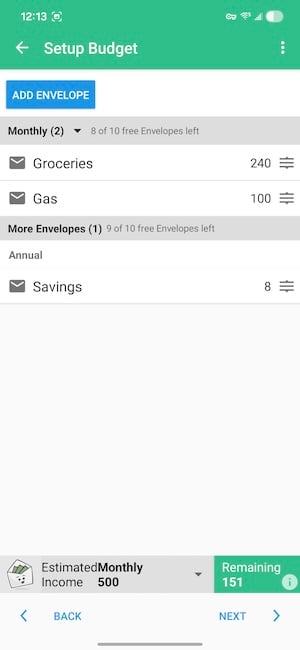
Image: Jessica Santero | WhistleOut
Goodbudget is very low-tech (and feels very Y2K) compared to some of the top premium budgeting apps. There's no bank connection, so you have to manually enter every transaction yourself. It may seem tedious, but adding in each expense forces you to be more aware of what's actually being spent. It may also stop you from another unnecessary CVS run since you just don't want to add the receipt.
For a recent grad who isn't yet managing multiple accounts and investment portfolios, Goodbudget is a low-pressure way to build a budgeting habit from scratch. The free version gives you 20 envelopes across two devices, which is more than enough to get started without paying for a subscription. If you want to eventually upgrade, other paid options on this list offer a more powerful experience.
If you're looking for a free, no-frills starting point, Goodbudget is unbeatable.
Can I trust Goodbudget? Yes.
Despite being a free app, Goodbudget does not sell your personal information at any time. For a free app, that's not something you can take for granted. You can read their full privacy policy for the details.
Best premium app: YNAB (You Need A Budget)
The budgeting app that saved me $3,000 in one year

- Available for iPhone and Android
- Premium subscription costs $21.99/month.
- Free year available for college students.
I've always tried to keep a close eye on my personal finances, but never quite found the right system. Excel and Sheets worked up to a point, but once I started investing, tracking multiple accounts, and trying to plan ahead for bigger expenses, it all fell apart.
With YNAB, you can keep all of your accounts in one place, analyze your spending patterns, and see predictions for where you can save with realistic solutions. It also nudges you to budget ahead for bigger annual expenses like car insurance and vacations, so you're never scrambling when something comes up.

Image: Jessica Santero | WhistleOut
YNAB uses zero-based budgeting, which means you give every dollar a specific job before you spend it. Your entire paycheck is assigned and planned—rent, groceries, student loans, and fun money.
The app definitely takes some getting used to, and YNAB is completely open about the fact that there's a steep learning curve. But when it clicks, the savings are serious. Since I started using it, I've saved $3,000 and maxed out my retirement savings this year alone. I can see patterns, adjust habits, and make informed decisions instead of wondering where everything went at the end of the month.
I saved $3,000 and doubled my retirement contribution...in a single year with YNAB.
The logic behind YNAB isn't being frugal; it's being financially aware. It isn't my top pick for recent grads at $21.99/month, but it's certainly the next step and ultimate financial tool everyone should graduate to. YNAB has eliminated most of my financial stress and helped me save substantially more than it costs—it practically pays for itself. If you used Mint before it shut down in 2024, YNAB is the most similar Mint alternative. It goes further than Mint ever did by teaching you to plan your spending, not just track it.
Pro tip: if you're still in school, YNAB offers a free one-year subscription for college students. Sign up before you lose access to that discount.
Cut your phone bill in half
One area where YNAB helped me spot an easy win was my phone bill. I realized I was paying for a premium plan I rarely used. If you're still on your parents' phone plan and thinking about going independent, now is a great time to budget for it.
Switching to a more affordable plan with Visible (in the US) saved me an extra $40/month—money I could redirect or invest.
Check out the most popular budget-friendly plans, so you can save like I do:
|
Freedom Mobile
$35 5G+ Unlimited 10GB CA-US plan
$35.00/mth
(after Digital Discount)
|
|
Fido

$37.50 Data, Talk & Text Plan with 2GB
$37.50/mth
|
|
Telus
Select Family 15 5G+
$60.00/mth
(after $10/mo. credit)
|
Best for subscription hoarders: Rocket Money
The app that finds the subscriptions you forgot you had
Rocket Money is a budgeting app that specializes in managing subscription overspending. Budget making and expense tracking are only a few of Rocket Money's features, with subscription cancellation and bill negotiation being the most coveted. That's right—this app will cancel your subscriptions and heckle your internet provider for discounts, for you.
Depending on which features you want to use, Rocket Money charges on a sliding scale and can cost between $6 and $14 per month. You pick where on that sliding scale you want to land and what services you plan on using.
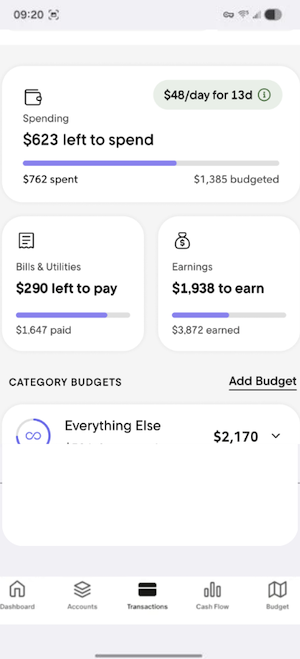
Image: Jessica Santero | WhistleOut
Rocket Money connects to your bank accounts, scans your transactions, and lines up every recurring charge on one screen—streaming services, app memberships, and forgotten free trials that have been quietly billing you for months. For a new grad who's accumulated a few years of student subscriptions, Rocket Money can show you exactly what you're still paying for. Plus, you can cancel subscriptions directly through the app without having to track down each company individually.
A word to the wise: Rocket Money's bill negotiation feature is handy, but it takes a cut of the first year's savings as a fee. Redditors have had a lot to say about this model.
- What Reddit says about Rocket Money's bill negotiation: u/ralphinator316 complained in r/personalfinance that, "It will cancel the subscriptions but it'll charge you for canceling (we saved you $400 a year so 'give us half of those savings'). So it is and isn't a scam... you do get canceled subs but you also pay for it. Why don't you just import two months' bank statements into AI and find recurring charges?"
Best money tracker: Monarch Money
The app designed for master budgeters
- Free trial available for iPhone and Android
- Premium subscription costs $16.97/month.
- Affiliate discount codes from creators are often available.
Monarch Money is the app you grow into once you already know how to budget. It connects to all of your financial accounts in one place—bank accounts, credit cards, loans, and investments—giving you a complete picture of your financial life on a single dashboard.
Like how YNAB is unrivaled for personal budgeting, Monarch Money offers a more holistic household money management solution, and even lets you invite one other person to collaborate on shared finances at no extra cost. If you're splitting rent or utilities with a roommate, Monarch is really handy.
Monarch costs $16.97/month, but that includes everything from tracking to a built-in AI assistant you can actually chat with. The bot is particularly handy for answering specific questions like "how much did I spend at Trader Joe's last month?" or "calculate how much I've spent on coffee this year" without having to dig through reports yourself.
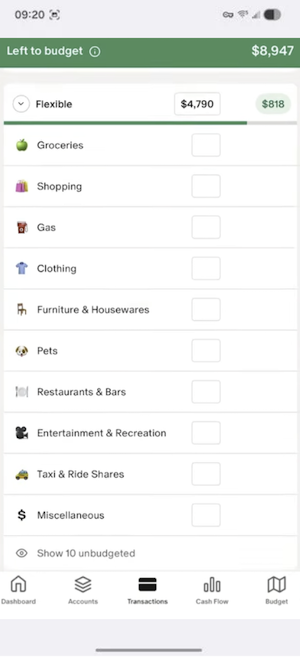
Image: Jessica Santero | WhistleOut
The only real drawback is the price. At $16.97/month with no cheaper tier, it's a commitment if you're just starting out and money is tight. Investment planning also isn't as detailed as it could be, so if you're serious about growing your portfolio alongside your budget, you may want something more specialized down the line.
That said, a seven-day trial is enough to get a real feel for it, and you can often find an affiliate code from a creator you follow to save on your first year.
Tips for making your budgeting app actually stick
Downloading a budgeting app is the easy part. Using it consistently is where most people fall off. A few things that actually help:
- Set it up completely before you start. Link your accounts, add your recurring bills, and create your spending categories before your first paycheck hits. Starting from a blank slate is harder than adjusting an existing budget.
- Check in weekly, not just monthly. A monthly review tells you what went wrong after it's already happened. Weekly check-in lets you adjust before you've blown your budget.
- Give every dollar a category, including fun money. Budgets that leave no room for enjoyment don't last. Build in a realistic amount for dining out, entertainment, or whatever you actually spend money on.
- Don't start over when you mess up. Overspending in a category doesn't mean the budget failed. Move money from another envelope, adjust next month, and keep going.
- Make it a habit, not a task. The best budgeting app is the one you actually open. Pick the one that fits how you think about money, not the one with the most features.
Budgeting apps for new grads: FAQ
What's the best free budgeting app for someone just starting out after college?
Goodbudget is the best free option for someone starting from scratch. It doesn't cost anything, doesn't require a bank connection, and teaches you the envelope budgeting method.
What's the best budgeting app for tracking student loan payments?
YNAB is the best option for tracking student loans, along with the rest of your budget. Its zero-based system lets you assign a dedicated category to loan payments each month, and its loan payoff simulator shows you how extra payments affect your payoff timeline.
Can budgeting apps see my bank account balance?
Yes, but only if you agree to link your account. Apps like YNAB, Simplifi, Rocket Money, and Monarch connect through a secure third-party service called Plaid, which lets them see your transactions and balance, but can't move or access your money. If you'd prefer not to link your accounts, Goodbudget works entirely on manual entry.
What's the difference between budgeting and expense tracking?
Expense tracking shows you where your money went after the fact. Budgeting means planning where your money will go before you spend it. The best apps do both—they track your actual spending against a budget you've set, so you can see in real time whether you're on track or need to adjust.
Jessica Santero
Staff Writer

Find a better phone plan
Thousands of cell phone plans unpacked. All the facts. No surprises.

Related Articles



Find Better Phones and Plans
Hundreds of cell phone plans unpacked. All the facts. No surprises.