I've caught myself opening Instagram before my brain even registered what my thumb was doing. It's not a willpower problem, but a habit that most apps do nothing to interrupt. ScreenZen is one of the best screen time apps for breaking that loop without locking you out of your phone entirely.
Instead of blocking apps, it inserts a delay the moment you tap one of your flagged apps, giving your brain a second to catch up to what your thumb just did.
ScreenZen
- Price: Free (tip-supported)
- Platforms: iOS, Android
Cutting screen time? It might be time to cut your data bill too.
If you're spending less time on social media and streaming, there's a good chance you're using less data than your current plan allows. Many carriers offer affordable limited-data plans that cover everything you actually need.
Check out the most popular unlimited plans below to compare.
|
Rogers

Popular Plan
$85.00/mth
(after Auto-Pay discount)
|
|
Rogers
Popular Plan
$85.00/mth
(after Auto-Pay discount)
|
|
Freedom Mobile

$50 5G+ Unlimited 175GB CA-US plan
$50.00/mth
(after Digital Discount)
|
What is ScreenZen?
ScreenZen is a free screen time management app for iPhone and Android that adds a delay screen every time you open a flagged app. It doesn't remove the app from your home screen or hide the icon. It lets the app load, then immediately interrupts you with a pause that makes you confirm whether you actually want to open it. Those few seconds are enough to break the automatic behaviour behind most mindless scrolling.
Why is ScreenZen so effective?
Most phone pickups are unconscious. If you're like me, you don't decide to open TikTok, your thumb just does it. The delay screen forces a moment of conscious awareness before the app fully loads, and that moment is where the habit breaks. Most of the time, you put the phone down without opening the app at all.
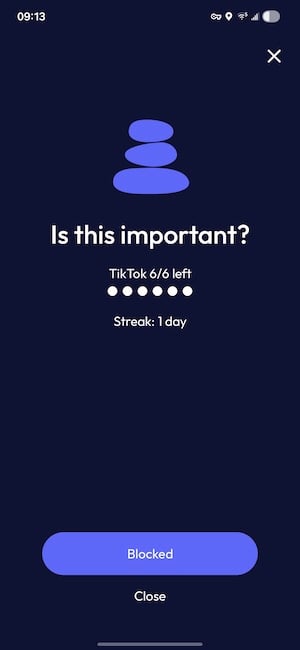
Image: Jessica Santero | WhistleOut
I tested ScreenZen for a month across Instagram, TikTok, and YouTube, and my daily use on all three dropped to just 30 minutes per day within two weeks. The streak counter helped too. Seeing 12 consecutive days made me less likely to blow past the pause just to scroll for five minutes.
Strict mode is there when a pause isn't enough
If the delay alone isn't doing the job, ScreenZen lets you layer on harder restrictions. You can schedule full blackout windows, set daily time limits per app, or configure a gesture unlock that requires a deliberate physical sequence before your limits can be overridden. I set up a three-step gesture system during testing, and it made cheating inconvenient enough that I stopped bothering. Putting the phone down was easier than going through the unlock process.
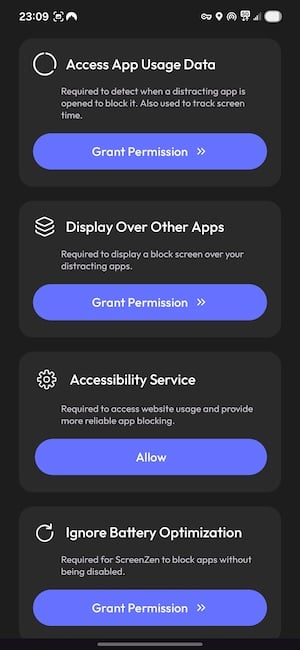
Image: Jessica Santero | WhistleOut
Setup requires four permissions: data usage access, display over other apps, accessibility service, and permission to ignore power-saving mode. It's a longer process than most free apps, but you only do it once, and the app walks you through each step clearly. ScreenZen is completely free, which is rare for an app in this category that actually delivers. The developer runs it on tips, so if it works for you, leaving one is a good way to keep it going.
Same Rogers coverage, lower monthly bill
Rogers MVNOs run on the same network towers for significantly less per month. If you're on Rogers and haven't compared rates lately, it's worth five minutes to see what's available.
|
Fido

$50 Data, Talk & Text Plan with 60GB - Entry
$50.00/mth
with Auto-Pay discount
|
|
Fido
$50 Data, Talk & Text Plan with 60GB - Entry
$50.00/mth
with Auto-Pay discount
|
|
Fido
$55 Data, Talk & Text CA-US Plan with 60GB
$55.00/mth
with Auto-Pay discount
|
How I tested ScreenZen

- Ran ScreenZen for four consecutive weeks on Instagram, TikTok, and YouTube
- Tested every restriction level, from basic pause to full blackout scheduling
- Configured the gesture unlock system and tracked how often I actually bypassed it
- Compared daily screen time before and after setup using Android Digital Wellbeing stats
ScreenZen: FAQ
Is ScreenZen actually free?
Yes, ScreenZen is completely free to download and use. The developer accepts optional tips, but there's no subscription or paywall blocking any features.
Does ScreenZen work on Android and iPhone?
ScreenZen is available for both iOS and Android, though Android setup requires granting additional system permissions including accessibility access.
Can ScreenZen be bypassed?
The basic pause can be dismissed, but enabling the gesture unlock system requires a deliberate multi-step physical action before any limit is overridden. Full blackout scheduling cannot be bypassed at all during active windows.
What is the difference between ScreenZen and One Sec?
Both apps use a pause to interrupt automatic app-opening, but ScreenZen offers more structural restriction options including blackout scheduling and gesture unlocks, while One Sec leans more heavily on breath-based mindfulness prompts.
Jessica Santero
Staff Writer

Find a better phone plan
Thousands of cell phone plans unpacked. All the facts. No surprises.

Related Articles


Find Better Phones and Plans
Hundreds of cell phone plans unpacked. All the facts. No surprises.