
The hardest part about learning to draw isn't the technique—it's knowing what to draw. I usually sit down with a blank page, and the page stays blank.
Sketch a Day helps you get started. Every day, it gives you a single-word prompt and a community of artists at every skill level interpreting the same prompt alongside you.
Sketch a Day is one of the best apps to learn a new skill, and it's the only app on the list that actively encourages you to put your phone down and pick up a pencil.
Download Sketch a Day now:
What is Sketch a Day?
Sketch a Day is a free drawing habit app for iOS and Android that gives you a new single-word prompt every day. But you aren't alone in your artistic venture. The prompt also shows you what other artists drew in response and invites you to share your sketch if you want to.
There are no skill prerequisites, no negative comments in the community, and no equipment required beyond a pencil and paper. The app also includes built-in drawing tutorials for anyone who wants structured guidance alongside the daily prompts.
Sketch a Day barely touches your data. Your other apps don't.
Stay connected to the Sketch a Day community everywhere you go. Switching to an unlimited data plan means you'll always be connected and never miss out on a prompt when away from home.
Here are the most popular unlimited data plans available right now:
|
Fido

$50 Data, Talk & Text Plan with 60GB - Entry
$50.00/mth
with Auto-Pay discount
|
|
Fido
$50 Data, Talk & Text Plan with 60GB - Entry
$50.00/mth
with Auto-Pay discount
|
|
Freedom Mobile

$40 5G+ Unlimited 70GB CA-US plan
$40.00/mth
(after Digital Discount)
|
How the daily prompt works
Each day's challenge is a single word. Read it and interpret it however you like, and (most importantly) sketch your response on paper or digitally. The interpretation is intentionally open, which is part of what makes the community gallery worth scrolling through. Every person draws something different in response to the same word, and the range is wider than you'd expect.
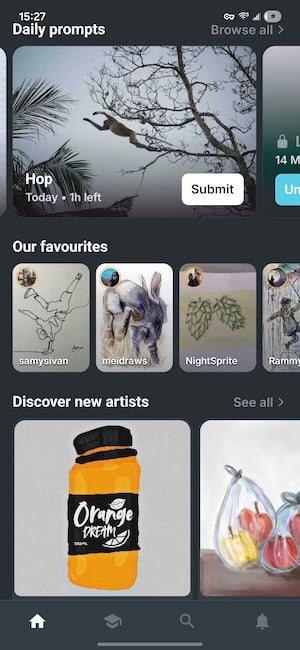
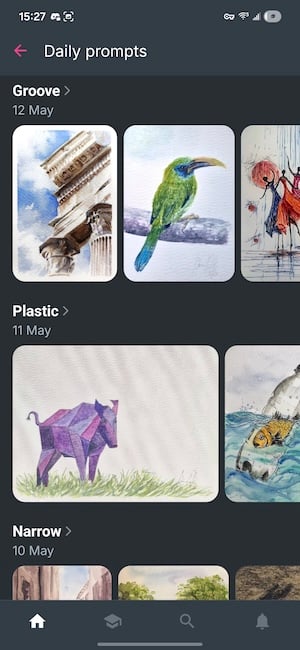
Image: Jessica Santero | WhistleOut
My personal favourite prompt was "Plastic." Submissions ranged from hyperrealistic still-life drawings of packaging to cheerful toy figures to abstract commentary on pollution. None of the submissions was wrong, and all of them were worth looking at.
The daily prompt becomes an art gallery with everyone's submissions. I've never been so inspired by so many talented people and yet so comfortable sharing something imperfect alongside them.
Connect with the community
There's no need to feel intimidated by Sketch a Day. The app's guidelines and moderators ensure there are no negative comments. Plus, the gallery for any given day includes submissions across the full skill spectrum. The point is participation, not performance.
Scrolling through the gallery for a prompt gives you a direct sense of how many ways a single idea can be interpreted. The built-in tutorials give you an extra boost with techniques you can practice, rather than leaving you with the prompt and no guidance. Sketch a Day also does something no other app on this list can claim: It reduces your screen time rather than adding to it. All you need is a pencil and paper.
 How I tested Sketch a Day
- Hands-on testing
Completed the daily prompt for two weeks and submitted drawings to the community gallery to observe interaction firsthand. - Community assessment
Browsed the community gallery across multiple prompts to assess the tone, skill range, and quality of submissions. - Tutorial review
Tested the built-in drawing tutorials to evaluate their usefulness for beginners with no prior drawing experience.
Sketch a Day app: FAQ
Is Sketch a Day free?
Yes, the Sketch a Day app is completely free to download and use, with no subscription required for the daily prompt, community gallery, or tutorials.
Do you need to be able to draw to use Sketch a Day?
No, you don't need to be a talented artist to use the Sketch a Day app. The community gallery includes submissions from complete beginners and experienced artists alike.
Do I have to share my drawing?
No, you don't have to share your art on Sketch a Day if you don't want to. You can use the daily prompt as a private drawing exercise without posting anything.
Does Sketch a Day have drawing tutorials?
Yes, the Sketch a Day app includes tutorials covering basic drawing techniques in case you want to brush up before you begin.
Jessica Santero
Staff Writer

Thousands of cell phone plans unpacked. All the facts. No surprises.

Related Articles



Find Better Phones and Plans
Hundreds of cell phone plans unpacked. All the facts. No surprises.